June 23, 2026 · Alex, MD
How I negotiate with the help of AI, part 2: running it
Part 2 of the negotiation week. Build the reusable assistant, pull the real numbers, send the email. And the honest answer on whether to let AI run the back-and-forth without you.
How I negotiate with the help of AI, part 2: running it
This is part 2 of a special-edition week on negotiating with the help of AI. Part 1 — setting it up — is here.
Yesterday covered the setup: name what you need, find who can deal, get to the right person. Today is the second half — where you build the tool, pull the real numbers, and decide whether you want AI to send the email or just write it.
Step 4: Build it once
This is the step that changes everything, and it is the one people skip.
What “build it once” actually means: create a skill. In Claude, that is a Project with standing instructions. In ChatGPT, that is a custom GPT or a saved set of instructions. Whatever platform you use, the goal is the same: a negotiation assistant that already knows how to do this, built from sources that actually know the math.
For a lease, I built mine from the places where real people post real deals: LeaseHackr (community deal sheets, money factor databases, monthly breakdowns people have actually gotten), Edmunds (current incentives, residual tables, money factors by vehicle and region), and a few other automotive reference sources. I gave the assistant everything and told it to treat those as its knowledge base before it does anything else.
The result is that when you say “I am looking at a 2026 [vehicle], 36 months, here is the dealer’s quote,” the skill already knows what other people are paying right now, what the current money factor should be, and what fees to watch for at signing. You are not starting from zero. You are starting from the collective research of thousands of people who have negotiated this exact deal before you.
“From now on, act as my negotiation assistant. You have been trained on LeaseHackr, Edmunds, and other real-deal automotive sources. When I give you a deal, you: rank the real options by true all-in cost, tell me what other people are actually getting, and flag what to watch for. I will say ‘new deal’ and give you the details.”
The first deal takes an afternoon to set up. Every deal after that is a thirty-second re-run. The method is useful once. Built into something you reuse, it is useful for the rest of your life.
Want the skill I built? Comment or DM “skill” and I will send it to you.
Step 5: Get the numbers they keep tangled
Every deal has numbers the other side prefers to keep tangled together, because tangled is where the money hides. A lease is the cleanest example. It is really four numbers — the selling price, the money factor (the interest rate wearing a disguise), the residual, and the incentives — and the dealer hands you one monthly payment that buries all four.
Have AI pull them apart, cross-check them against what other people are actually getting, and rank every option by what it truly costs all-in, not the headline number.
“For [the thing], pull the real current numbers. For a lease: selling price, money factor and the APR it implies, residual, incentives. For a service: market rate, typical quote range, what is negotiable, what is padding. Cross-check against LeaseHackr and Edmunds, recent quotes, or public benchmarks. Rank every option by what it truly costs all-in, not the headline price. Name the fees that only show up at signing.”
That cross-check is the quiet power move. When a dealer tells you the deal is special, you already know what specials other people got this week. The story stops working.
Once the deal looks right, build a second skill: a deal-checker. Give it the full breakdown, every line item the dealer has put in front of you, and ask it to find what is hidden, inflated, or inconsistent with what others are getting. It cannot read the room, but it can read a number. Run every final offer through it before you say yes.
“Here is the deal on the table: [full breakdown]. Act as a deal-checker. Tell me what is missing, what looks inflated compared to current benchmarks, what fees are unusual, and whether this is as strong a deal as I can reasonably expect. Be skeptical, not encouraging.”
Step 6: Draft the email, or let it run
Now the outreach. There are two ways to do this, and the difference matters.
Draft and approve. AI writes the email to your target number. You read it, adjust the tone, and hit send yourself. The reply comes back to your inbox and you decide every move. This is what most people do, and it is the right default for anything that matters.
“Draft the email to [contact] about [the thing]. My target is [number or terms]. Tone: friendly, direct, not desperate. Make it easy for them to say yes or counter. Give me three versions: the opening, the follow-up, and the walk-away.”
One more thing before you send anything. Train your AI on who you are.
In ChatGPT, that is the “About Me” section in custom instructions. In Claude, it is memory or the system prompt in a Project. Give it your tone, your level of formality, how direct you tend to be, how warm. The emails it drafts will sound like you wrote them, not like a robot who read a negotiation guide. That detail matters more than any individual prompt.
Automatic. This is what I did on the lease. I gave AI my walk-away number up front, and let it send the opening, watch for the reply, and work the response, pulling me in only at a decision point or my limit. The whole back-and-forth that usually eats a week of evenings happened in a handful of inbox checks.
To let it run, you add one line:
“Send it, watch for the reply, and draft my counter when it comes. Stop and ask me before agreeing to anything.”
Automatic is powerful, and it is not for everything. Use it for low-to-medium-stakes, numbers-driven, repeatable deals: a bill, a quote, a lease where the math is objective. Do not use it for your employment contract or anything tied to a person you will keep dealing with. And whatever you do, it never commits and it never signs. It negotiates to a number. You make the final call.
Which systems can actually send automatically
The difference comes down to whether your AI has real access to your inbox, or is just writing text for you to paste.
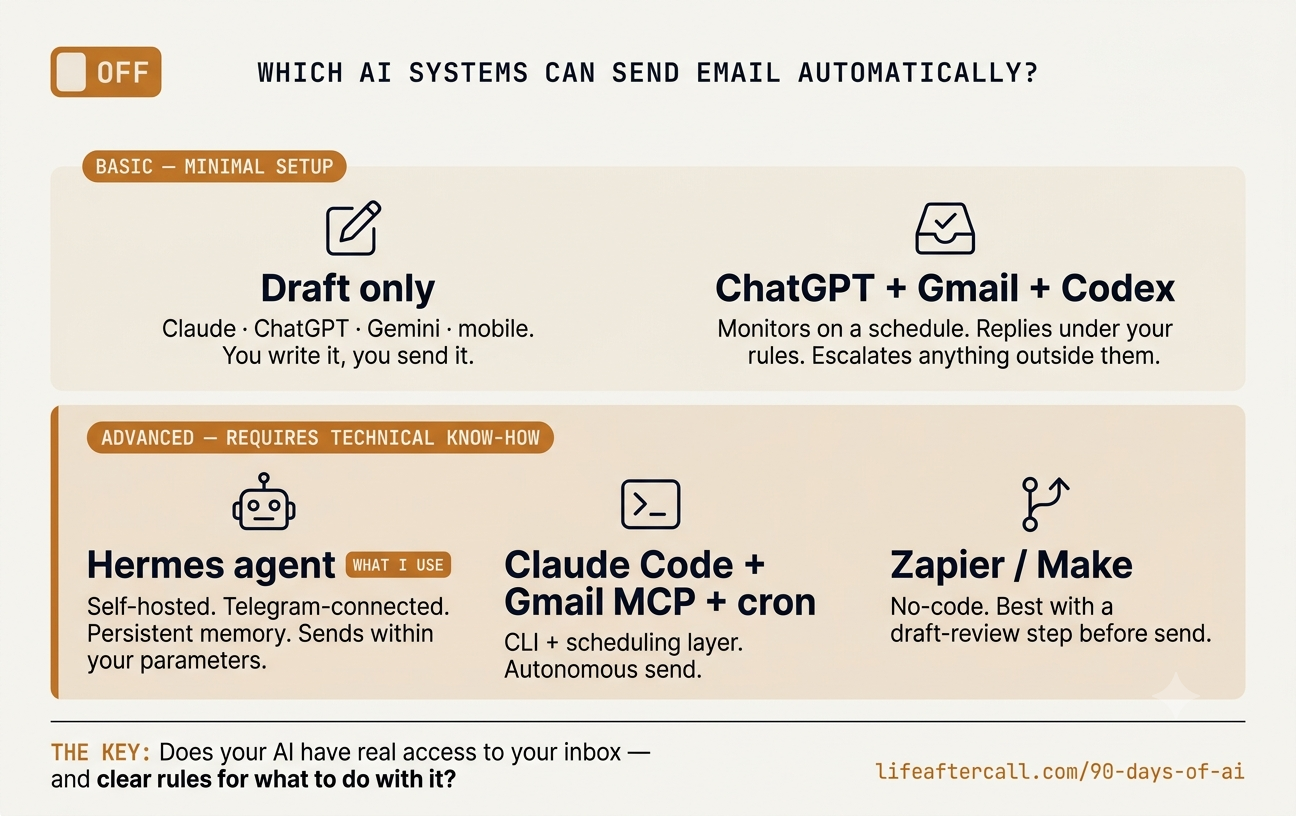
Basic — included with minimal setup
- Draft only (Claude.ai, ChatGPT, Gemini, any mobile AI). Any AI assistant can write the email. You copy, paste, review, and send. The reply lands in your inbox and you bring it back for the next draft. This is the right default for most people and most deals.
- ChatGPT + Gmail + Codex automation. Connect Gmail in ChatGPT settings, then use a Codex automation to monitor the thread on a schedule. It replies when a new message matches rules you set in advance. Three modes: draft-only (it prepares the reply, you approve — safest default), auto-send under rules (sends only when the email matches exact conditions you pre-approved), or escalate (if the message is ambiguous, involves new terms, or does not match a rule, it stops and asks you). Conditional, not free-running.
Advanced — requires technical know-how
- Hermes agent. This is what I actually use. Hermes is an open-source, provider-agnostic AI agent framework by Nous Research. My instance runs on its own server, is accessible over Telegram, and has persistent memory, email access, web search, and scheduled background jobs. It monitors my inbox for dealer replies, drafts the counter within the parameters I gave it, sends it, and pings me only at a decision point. It remembers preferences across every session — how I like things worded, what my walk-away number is, how to sign the emails. Setting it up is a weekend project. Once it is running, the negotiation moves without me until there is a real decision to make. Comment or DM “hermes” if you want to know more about setting one up.
- Claude Code + Gmail MCP + cron job. Claude Code can be scheduled to run on a timer via a launchd job or cron script, check your inbox, and send replies using the Gmail MCP tools. Powerful, but requires CLI comfort and the scheduling setup.
- Zapier / Make (Gmail API). No-code automation tools that run entirely in the background once configured. Best used to surface information or create drafts for review — for actual negotiation, keeping a human approval step before send is the safer call.
The basic path keeps you in the loop at every exchange. The advanced path removes that friction and also removes the ability to second-guess mid-thread, which is either a feature or a risk depending on what you are negotiating.
What it actually looked like
On my lease, the homework came back as a ranked list of the real market by effective monthly, with the money factor and residual cross-checked against what other people were getting that week, and the fees that only appear at signing named in advance. Then I set my number and let it run: the opening email went out, the dealer replied, the assistant surfaced it, and I held my target. A negotiation that usually costs me a week of dread has taken a handful of inbox checks.
I am not going to publish my dealer, my rep, or my real numbers here, for obvious reasons. The point is not the specific car. It is that the deal was decided by the homework, and the homework is the part you can hand off.
Where it gets things wrong
Be careful, because AI sounds exactly as confident when it is wrong. It will quote an incentive that expired, invent a residual that looks plausible, or soften a fee into something friendlier than the real terms. That is the normal failure mode: a clean, confident answer with a fabricated number inside it.
So the cross-check in step 5 is not optional. Verify anything that drives the decision against a real source before you rely on it. AI to do the homework and find the floor. You to check it and decide.
The limit
AI can find the floor on a deal. It cannot tell you the third row has to fit your in-laws, or when a fair deal is just good enough to stop hunting and sign. It is not legal advice, and it is not financial advice. For a binding document, a real professional reads it. The number it finds is the start of your judgment, not the end of it.
You stop walking in to negotiate. You walk in already knowing the answer.
The point
This week I am running the same six steps through a contractor bid, a medical bill, and a physician contract, one a day. Different deal, same method, because once you have built the assistant in step 4, that is all it is: the same six steps, pointed at whatever is next.
The next deal you are dreading does not have to be a week of evenings and a guess at the table. Most of it is homework. And the homework is the part you can hand off.
Want the full setup, step by step, with all six prompts? Comment or DM “playbook” and I will send it.
This is what a little breathing room looks like.
Strictly non-clinical. Nothing on this site is medical advice, legal advice, or financial advice, and I do not post about patient care. For a binding document, use a qualified professional.